AI08. Agent Infrastructure·EXPERT·4 min read
Production AI Harness and Model Context Protocol (MCP)
Production AI Harness and Model Context Protocol (MCP)
TL;DR
- Model Context Protocol (MCP) is an open standard that decouples LLM clients from tool servers, standardizing how models read resources, invoke tools, and load prompt templates.
- AI Harness is the outer runtime orchestration layer that wraps the LLM call, managing step budgets, token costs, context compression, tool schemas, and security gates.
- Least Privilege is enforced at the tool boundary. Agents should have scoped credentials, and high-impact operations (e.g., database deletes, production pushes) must be blocked by human-in-the-loop (HITL) gates.
- Replayability is achieved by logging the exact prompt, retrieved context, tool outputs, and LLM reasoning steps, enabling offline evaluations and regression testing.
MCP Protocol Architecture
The Model Context Protocol standardizes JSON-RPC communication between AI Clients and MCP Servers, defining three primary primitives:
- Resources: Read-only data sources (logs, files, database snapshots).
- Prompts: Standardized templates (system instructions, common queries).
- Tools: Executable functions that can mutate state (sandbox script execution, API updates).
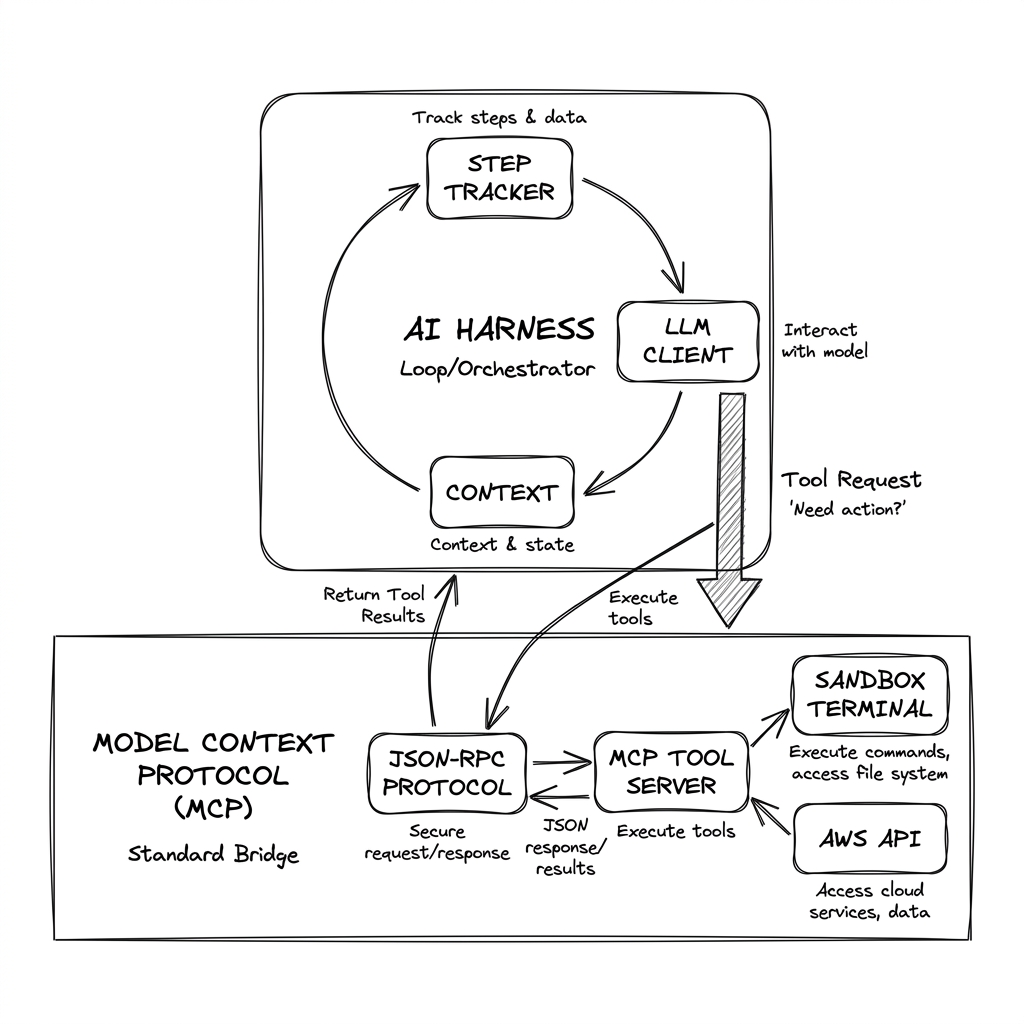
Protocol Interaction Flow
AI Client (Harness)                 MCP Server                   LLM Engine
       |                                |                            |
       | 1. Initialize (Tools List)     |                            |
       |------------------------------->|                            |
       | 2. Return Schema Map           |                            |
       |<-------------------------------|                            |
       |                                                             |
       | 3. Send prompt (Goals + Tools) ---------------------------->|
       |                                                             | 4. Decide: Call Tool
       | <-----------------------------------------------------------|
       |                                                             |
       | 5. Execute JSON-RPC: tool_run("deploy", {...})              |
       |------------------------------->|                            |
       |                                | 6. Run sandbox command     |
       | 7. Return tool stdout/stderr   |                            |
       |<-------------------------------|                            |
       |                                                             |
       | 8. Send result context ------------------------------------>|
       |                                                             | 9. Synthesize result
       | <-----------------------------------------------------------|
The AI Harness: Managing the Execution Loop
An LLM is passive; it only responds to inputs. An agent is active because it runs inside a loop managed by the AI Harness.
The Runaway Loop Danger
If a model fails to resolve an issue (e.g., a failing test), it might retry the same tool indefinitely, consuming thousands of tokens and inflating API costs. The harness protects against this by executing the loop within strict parameters:
[ HARNESS BOUNDARY ]
Goal -> [Step Tracker] -> [Context Loader] -> [LLM Call] -> [Tool Invoker] -> [Policy Gate]
             ^                                                                     |
+------------- (Evaluate Next Step / Loop Counter) <------------------+- Step Limits: The harness maintains a counter of loop steps (e.g., maximum 10 steps). If the model exceeds this budget, the harness halts execution and alerts the user.
- Token & Cost Budgets: The harness tracks input/output tokens dynamically, accumulating real-time dollar spends. If the transaction cost crosses a configured threshold, the session terminates immediately.
- Loop Detection: The harness inspects the history of decisions. If the model issues the exact same tool call with the exact same arguments three times sequentially, the harness breaks the loop.
DevOps Agent Sandbox Execution
For DevOps professionals, the execution of agentic loops must be sandboxed. Giving an agent access to a local terminal or production AWS console without isolation is a major security risk.
Reference Architecture: Isolated Remediator Agent
                   +----------------------------+
                   |  Host Node (Cluster Main)  |
                   +----------------------------+
                                  |
               Spawns isolated container under gVisor
                                  v
+--------------------------------------------------------------+
|                   gVisor Sandbox Sandbox                     |
|                                                              |
|   +-------------------+  stdio  +-----------------------+    |
|   |  Agent Client     | <-----> |   Local MCP Server    |    |
|   |  (AI Harness Loop)|         |  (read/write sandbox) |    |
|   +-------------------+         +-----------------------+    |
|             |                               |                |
|      LLM (HTTPS)                     Read/Write files        |
|             v                               v                |
|     +---------------+            +---------------------+     |
|     |  Claude/Gemini|            |  Mock Workspace Dir |     |
|     +---------------+            +---------------------+     |
+--------------------------------------------------------------+- Host Isolation: The AI Harness Client and the MCP Server run inside a temporary container isolated via runtimes like gVisor or Firecracker. The directory mounted to the container is a replica workspace, not the host node.
- Interactive Remediator Loop:
- The harness feeds a failing CI test log into the context.
- The agent calls
read_fileto inspect the source file. - The agent writes a patch using
write_file. - The agent executes
run_teststo verify the code compile and test passes. - If tests fail, the agent analyzes the new errors and repeats the patch loop (reflecting on its own mistakes).
- Once tests pass, the agent generates a Git diff and halts, requesting human approval via a webhook.
Common Pitfalls
- Pitfall: Running MCP servers with wildcard host bindings. Why: Exposing tool servers over the network without authentication allows attackers to run unauthorized commands. Fix: Use local stdio transport pipelines by default, keeping JSON-RPC payloads inside local process boundaries.
- Pitfall: Omitting Human-in-the-Loop (HITL) gates for structural changes. Why: An agent might correctly patch a bug but inadvertently delete a database table or release credentials. Fix: Intercept tool actions labeled as high-impact at the harness layer and require explicit approval before execution.
- Pitfall: Verbose log dump context bloating. Why: Dumping raw container logs or build outputs directly into the context window consumes token budgets and dilutes the model’s focus. Fix: Truncate, structure, or summarize logs before returning them as tool results.
Knowledge check
5 scenario questions on this topic